

Event Scopes: Practitioner vs Office
In OutSmart, Event Types can have one of two scopes: Practitioner or Office. This setting allows you to customize your list of available events based on your location.
In the event type editor, you choose the scope in the box labelled Appointment is associated with (the label follows the event’s category, so a Non-Patient event type shows Event is associated with and a Background event type shows Background Event is associated with). The two choices are Practitioner and your office’s name.
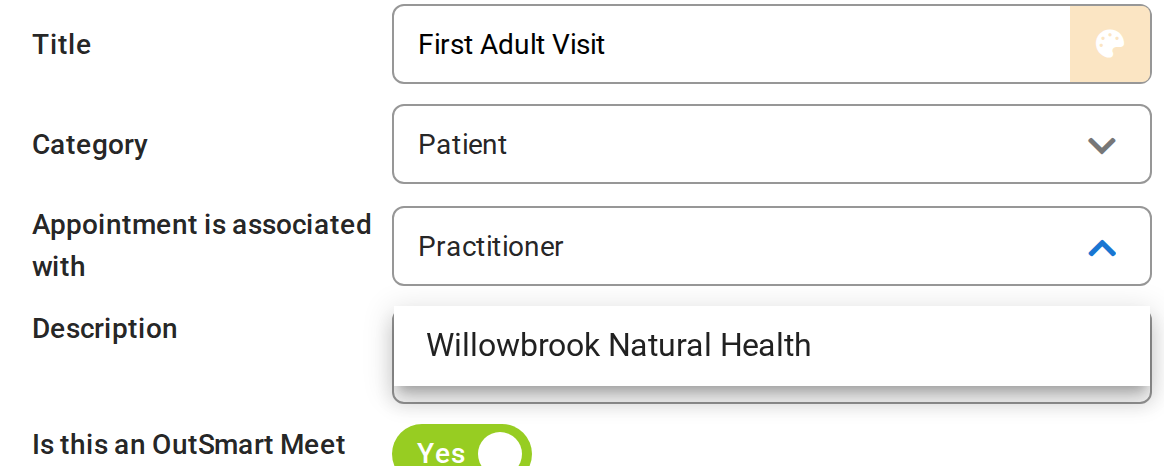
Appointment is associated with: Practitioner, or your office.
Practitioner Event Type
A Practitioner Event Type is an event that is available across all of your clinic locations. It is tied to the practitioner who created it, regardless of where they are practicing. If you work in multiple locations, each set up as a separate Office in OutSmart, a Practitioner Event will be available and bookable for you in all of them. This is a good option for practitioners who work in multiple locations but always offer the same service at each.
Practitioner Events are also only bookable by the practitioner who created them. For example, if you create a Practitioner “Initial Visit” event type, then this type of booking would only be available to you and no one else at the clinic. This is a good idea if you are a specialist working at a clinic and the types of appointments you offer are unique. Setting them as Practitioner Events ensures they will not clutter the event type list for other practitioners at the clinic.
Office Event Type
An Office Event Type is unique to a single location. This event will only appear as a bookable option in the specific office where it was created, not in your other offices. This is useful for organizing your Event Types by office, or when the properties of an event are different for each location.
Additionally, Office Event Types are available for all members of the office to book. This is useful if the clinic is standardizing a specific kind of service that many practitioners at the clinic are able to offer. This helps to standardize the service across all practitioners at the clinic.
Who Can Choose the Office Scope
Only the office owner can choose the office as the scope and can change an office event type. For everyone else, the scope box is greyed out, and office event types show a lock in the Event Manager instead of the edit, duplicate and delete icons.